
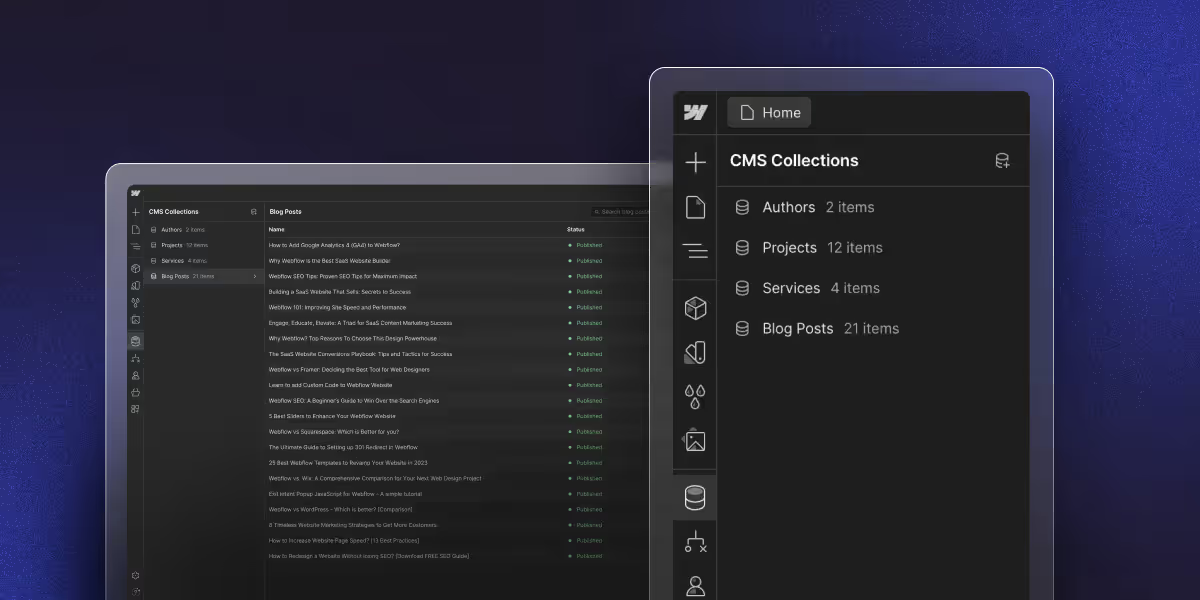
Webflow CMS Collection pages rank as well as static pages but only if the Collection Template is set up correctly. The three highest-impact fixes are:
1.bind your meta title and meta description fields to CMS fields so every item gets unique meta tags automatically. 2. add FAQPage or Article schema per item via a rich-text schema-code field bound to an Embed element in the page body, and 3.ensure canonical URLs point to the primary Collection URL, not any filtered or paginated variant.
Get these three right and Collection pages will index and rank the same way static pages do. The most common mistake is a Collection Template where every item shares the same meta title Google treats these as duplicate pages and suppresses all but one
To optimize Webflow CMS Collections for SEO: set dynamic meta-title and meta-description fields on each Collection, map Collection Template Pages to those fields, add a CMS-bound FAQPage schema via a rich-text field, set canonical URLs to prevent duplicate-content issues, and structure internal links between Collection items using the head-term anchor of each linked item.
Webflow CMS Collections power most blog, portfolio, and catalog sites built on Webflow but the default Collection Template settings don't always produce SEO-ready pages. To rank, each Collection item needs its own dynamic meta tags, structured data, internal linking strategy, and canonical handling.
This guide covers exactly how to set those up, the common Webflow CMS SEO mistakes that cause pages to underperform, and the 2026 best practices for dynamic-page SEO. All instructions reference the current Webflow Designer UI.
What is Webflow CMS?
Webflow CMS is a visual content management system built into the Webflow platform that allows you to create, manage, and modify content without requiring coding expertise.
Unlike traditional CMS platforms that separate design from content management, Webflow CMS integrates content management directly into its visual design tool.
This visual design tool helps to enable you to see exactly how your content will display as you build it.
Learn More: how Webflow's CMS compares to a traditional one
Why CMS Content Beats Static Pages
Dynamic content has clear SEO benefits over static pages. This matters most if you publish often or manage lots of content. Search engines reward fresh content and topic depth, which CMS collections provide.
Scalability helps as your content grows. Static pages require individual work for each piece. Webflow CMS lets you build optimizations into templates. Every new item gets proven SEO tactics without extra work.
Search engines crawl better with structured CMS collections. When content follows clear patterns, search engines grasp your topic authority faster. This helps rank both individual pages and your full domain.
Content freshness happens automatically with CMS sites. Updates, dates, and timestamps tell search engines your content is current and relevant.
Clean HTML output sets Webflow CMS apart from old systems.
What is Webflow CMS SEO
Webflow CMS SEO is the practice of optimizing dynamic pages (Collection Items rendered through a Collection Template) so they rank in search the same way static pages do. This means setting unique meta tags per item, adding structured data, controlling canonical URLs, and building topical internal links between Collection items.
The core challenge: a Collection Template Page is one design that renders thousands of unique URLs. Every SEO setting on that template propagates to every item, so getting the template right is high-leverage. Get it wrong and every item inherits the same problem.
How to Set Dynamic Meta Tags for Webflow CMS Collections
Webflow lets you map Collection fields directly into the meta-title and meta-description of every Collection Page. This is the single most important Webflow CMS SEO setup step — without it, every Collection item shares the same generic meta tags from the template.
- Open the Collection Template Page in Designer
- Click Page Settings (gear icon, top-right of the page panel)
- Scroll to SEO Settings
- In Title Tag, click the purple dynamic-data icon and bind it to your
meta-titlefield (or to Nameas a fallback) - In Meta Description, bind to your
meta-descriptionfield - Republish
For the meta fields to actually work, you need to add them to the Collection schema first: open the Collection's Settings → Customize Fields, add meta-title (Plain Text, max 60 chars) and meta-description (Plain Text, max 160 chars), then fill them for every existing item.
Planning Your Collection Structure
Hierarchical organization forms the base of good Webflow CMS SEO optimization. Plan collections to match user intent and search patterns. Create logical links between collections that reflect natural topic flow.
Category design should help with navigation and SEO together. Build category systems that help users find content while creating topic clusters that search engines understand. Keep it simple and intuitive.
URL structure needs careful planning for maximum impact. Design slug patterns with relevant keywords that stay readable. Think about how URLs look in search results and social shares.
Collection links create the internal structure that lifts your whole website's SEO. Plan reference fields that connect related content naturally.
Essential SEO Fields for Every Collection
Add these SEO fields to every collection type:
- Meta Title (60 character max)
- Meta Description (160 character max)
- Focus Keyword
- Alt Text for Featured Image
- Canonical URL (when needed)
- Publication Date
- Last Modified Date
- Author Reference
- Category Reference
- Tags (multi-reference)
Dynamic meta-fields enable optimization that scales. Create formulas that mix collection data with keywords. Every page gets unique, optimized meta tags automatically.
Image fields, including alt text, captions, and filenames, should be required. These help accessibility and give search engines context about the images.
Category and tag systems create the links that search engines use to understand content. Design tags based on keyword research and search patterns.
Building SEO-Friendly URLs
Set up URL patterns before creating content. Include relevant keywords while keeping hierarchy clear. Avoid deep nesting that makes URLs too long.
Collection paths require smart decisions about content organization. Think about where blog posts live (/blog/), case studies (/work/), or products (/shop/). Stay consistent across content types.
Canonical URLs stop duplicate content issues. Use collection fields to handle cases where content lives at multiple URLs.
Dynamic Meta Tag Automation
Title tag formulas remove the tedious work of manual optimization. Build smart formulas that combine fields to create compelling titles automatically:
Title Formula Examples:
- Blog: [Post Title] | [Category] Guide | [Brand Name]
- Products: [Product Name] - [Category] | Buy Online at [Brand]
- Services: [Service Name] in [Location] | [Brand] Professional Services
Meta description automation keeps optimization consistent while allowing for custom tweaks. Build templates that pull from fields to create descriptions that drive clicks and include keywords naturally.
Open Graph fields make your content look good on social media. Map collection fields to Open Graph Tag properties for optimized social previews automatically.
Character limits prevent cut-off meta tags that hurt performance. Add validation and visual cues to help creators stay within limits while maximizing keywords.
Collection-Specific Optimization
Blog meta optimization balances keywords with compelling copy. Build templates with post titles, categories, and dates while keeping natural language.
Product SEO fields should include price ranges, stock status, and categories in descriptions. This helps search engines understand products and give users key info.
Portfolio optimization showcases skills, industries, and project types that match target keywords. Create templates that highlight your expertise while staying professional.
Internal Linking Systems
Related posts create natural links that build authority and boost engagement. Use smart algorithms that connect content through categories, tags, and keywords, not random picks.
Category linking connects every piece within a topic cluster. Design category pages as content hubs that link to all related items and target broader search terms.
Tag connections create links that search engines value. Design tag systems based on search patterns and keyword research.
Strategic patterns ensure link authority flows well across your site. Build systems that prioritize high-value pages while covering your full content library.
Topic Clusters and Anchor Text
Topic clusters group related content around pillar pages for broad keywords. Cluster content targets long-tail terms. This shows search engines your topic authority.
Anchor text in automated linking should vary naturally while staying descriptive. Use diverse patterns that feel natural while providing SEO value.
FAQPage Schema to Webflow CMS Collections
Structured data is the single biggest ranking lever for blog-style CMS Collections in 2026 — pages with FAQPage schema show up in AI Overviews and rich results far more often than pages without.
The pattern that works in Webflow:
- Add a Rich Text field called
schema-codeto your Collection (Settings → Customize Fields → Rich Text). - For each Collection item, paste the JSON-LD into the
schema-codefield, wrapped in:<div data-rt-embed-type="true"><script type="application/ld+json">...</script></div>. Webflow's rich-text renderer recognizes thedata-rt-embed-type="true"attribute and outputs the script tag cleanly. - On the Collection Template Page, add an Embed element to the page body (not Page Settings → Custom Code). Select the Embed, click the gear icon, and bind it to the
schema-codeCMS field. - Publish. Each item now renders its own unique JSON-LD schema on the page.
Why not Page Settings → Custom Code? The custom code fields in Page Settings are static they accept literal text only, not CMS field bindings. Any script you paste there renders identically on every Collection item. For per-item schema (different FAQ questions on each blog post), you must use the CMS Rich Text field + body Embed approach above.
Read More: How to Add Schema Markup in Webflow
Article schema for Webflow CMS blog posts
FAQPage schema targets rich results for Q&A content. Article schema targets a different set of signals: Google Discover, AI Overview citations, E-E-A-T author authority, and structured publication data. For blog-style CMS collections, both types of schema serve different purposes and both should be present.
Article schema tells Google the author, publication date, last modified date, headline, and image for each post. This is particularly important post-Helpful Content Update Google's quality signals increasingly factor in author credibility and content freshness, and Article schema is the clearest way to communicate both.
Article schema template for Webflow blog CMS items:
Add this to each blog post's schema-code field (in addition to FAQPage schema if the post has FAQs), wrapped in the data-rt-embed-type="true" div:
<div data-rt-embed-type="true">
<script type="application/ld+json">
{
  "@context": "https://schema.org",
  "@type": "BlogPosting",
  "headline": "[Post title — bind to CMS Name field]",
  "description": "[Post meta description — bind to CMS meta-description field]",
  "image": "[Featured image URL — bind to CMS image field]",
  "author": {
    "@type": "Person",
    "name": "Viken Patel",
    "url": "https://www.thecssagency.com"
  },
  "publisher": {
    "@type": "Organization",
    "name": "theCSS Agency",
    "logo": {
      "@type": "ImageObject",
      "url": "https://www.thecssagency.com/[logo-path]"
    }
  },
  "datePublished": "[CMS published-on date field — ISO 8601 format]",
  "dateModified": "[CMS updated date field — ISO 8601 format]",
  "mainEntityOfPage": {
    "@type": "WebPage",
    "@id": "[CMS slug field as full URL]"
  }
}
</script>
</div>
Implementation notes for Webflow:
- In Webflow's Collection Template, the JSON-LD values need to be manually updated per item (since rich-text fields don't support inline CMS field bindings within the JSON). The more scalable approach: use a sitewide BlogPosting schema that references the author and publisher statically, then add per-post headline and date via a second schema approach, or accept manual per-item entry for the most critical posts.
- The
datePublishedanddateModifiedfields use ISO 8601 format:2026-06-15T00:00:00+00:00. Webflow's Date field stores dates in a compatible format use the Webflow Date field value directly. - Webflow's blog template already outputs a
BlogPostingArticle schema if you have one set up in the template's head code. Check whether your blog template already has sitewide Article schema before adding per-item schema to avoid duplication.
Canonical URLs and Duplicate Content on Webflow Collection Pages
Webflow auto-generates a canonical tag on every Collection Page pointing to the item's primary URL. This handles 95% of cases -but you can hit duplicate-content issues in three scenarios:
- Same content across multiple Collections e.g., a blog post that also appears in a "Featured" Collection. The canonical should point to the primary blog Collection, not the featured one.
- Pagination of Collection lists - paginated list views (page=2, page=3) should canonical to the unpaginated parent.
- URL parameters added by tracking - UTM-tagged URLs should canonical to the clean URL.
To set a custom canonical, open the Collection Template Page → Page Settings → Custom Code → Inside <head> tag, and paste.
CMS List Page Pagination and SEO
When a Collection list has more items than fit on one page, Webflow generates paginated URLs: /blog, /blog?page=2, /blog?page=3. These paginated views can create thin-content and duplicate-meta issues if not handled.
What Webflow does automatically: Webflow adds a canonical tag on paginated pages pointing back to the root list page (/blog), which correctly tells Google that the paginated variants are not the primary URL. You don't need to manually configure this.
What you should check:
- Confirm the list page meta title and description are set on the Collection list page (not just the item template). The root list page (
/blog) often has a blank meta description, which defaults to the first paragraph of the page - rarely the best description. - If your paginated pages are appearing in Google Search Console coverage as "Duplicate - submitted URL not selected as canonical," this is expected behavior. Don't suppress paginated URLs with noindex - let the canonical tag handle it.
- For large Collection lists (100+ items across many pages), verify in GSC that the canonical consolidation is working - check the Coverage report filter for pages matching
?page=.
Webflow SEO Services Process
Discovery and Website audits start every project with a deep analysis of content, user behavior, and business goals. This ensures our plans match SEO goals and user needs.
Architecture planning creates detailed blueprints for collections, field relationships, and optimization systems before building. This prevents costly redesigns and allows growth.
Implementation follows proven methods from hundreds of Webflow CMS projects. We focus on technical quality and measurable results.
Webflow CMS SEO Tips for Blogs
Success requires more than page-level work. You need a strategic architecture that scales and amplifies every piece you publish. The collection structures, dynamic systems, and automated linking in this guide provide the foundation for lasting search growth.
The best sites in 2026 will have smart CMS systems that improve search performance. Each new piece of content strengthens your whole site's search authority.
Get Expert Help
Ready to transform your Webflow CMS into an SEO engine? theCSS Agency builds advanced CMS architecture that delivers real search improvements. Our webflow seo services team can design systems that drive lasting organic growth.
Schedule your CMS SEO consultation today and see how strategic content architecture can speed up your search visibility and business growth.
Webflow CMS SEO - FAQs
1. What is Webflow CMS SEO?
Webflow CMS SEO is the practice of optimizing Collection Template Pages so that every item renders with unique meta tags, structured data, and correct canonical URLs the same way a well-optimized static page does. The core challenge is that a single Collection Template governs hundreds or thousands of URLs: every SEO setting on that template propagates to every item. This makes getting the template right extremely high-leverage. Common gaps include identical meta titles across all blog posts (because the meta title field isn't bound to a CMS field), missing schema markup on individual items, and canonical issues from content appearing in multiple Collections.
2. How should I structure my Webflow CMS collections for better SEO?
Start with clear URL patterns that include keywords and match user intent. Create logical category systems that group related content together. Add reference fields that link collections naturally, like connecting blog posts to authors and categories. Plan your structure before creating content.
3. What are the most important Webflow CMS SEO features to use on blog posts?
Three features have the highest impact. First, dynamic meta tag automation: bind the meta title field to your CMS Name or meta-title field so every post gets a unique, keyword-specific title. This alone fixes the most common CMS SEO issue. Second, FAQPage or Article JSON-LD schema via a rich-text schema-code field: structured data significantly increases the chance of appearing in AI Overviews and rich results. Third, publication and modified dates bound to CMS Date fields: these tell Google your content is current, which matters for time-sensitive topics where freshness is a ranking signal.
4. How can I optimize images in Webflow CMS to improve Core Web Vitals?
Use Webflow's built-in image compression and serve images through the CDN. Add required alt text fields to every image in your collections. Set up responsive image sizing so mobile users get smaller files. Enable lazy loading for images below the fold.
5. What types of structured data should I add to Webflow CMS for better search results?
Add Article schema for blog posts with author, dates, images, and categories. This helps you appear in rich snippets. Use Product schema for online stores with pricing, stock status, and reviews.
6. Do Webflow CMS pages rank as well as static pages?
Yes Google treats Collection Pages identically to static pages once they have unique meta tags, content, and structure. The two factors that hurt CMS Collection SEO are (1) thin content (under 300 words per item) and (2) duplicate meta tags across items. Fix both and Collection Pages rank as well as anything else.
7. Can I noindex specific Collection items in Webflow?
Not via the UI on a per-item basis. To noindex specific items, add a Switch field called noindex to your Collection, and conditionally inject a <meta name="robots" content="noindex"> tag in the Collection Template Page's custom head code using Webflow's conditional visibility.