
The best WordPress alternatives in 2026 are Webflow(visual design with clean, exportable code), Squarespace and Wix (simplest all-in-one builders), Framer (fast, design-led sites), Ghost (publishing and newsletters), and headless options like Strapi or Contentful for developer teams. The right choice depends on whether you value design control, ease of use, or developer flexibility
Many users find WordPress overwhelming due to its complexity, especially for beginners. Constant updates, the need for third-party plugins to extend functionality, and potential security risks often push people to look for other options.
Are you searching for the best alternatives to WordPress that can meet your needs? Here are 9 modern, powerful, and user-friendly WordPress alternatives & competitors in 2026.
What to Look for in a WordPress Alternatives
When searching for the best top alternatives to WordPress for building your website, it's crucial to evaluate platforms based on your unique needs. Here are some essential features to consider:
Key Features:
- Ease of Use & Design Flexibility: Drag-and-drop builders, intuitive interfaces, and visually appealing templates.
- Built-in SEO Tools: Platforms with SEO-friendly features like meta tags, clean code, and structured URLs.
- Performance & Scalability: Fast loading times, uptime reliability, and the ability to grow with your needs.
- Templates: WordPress alternatives also provide customizable templates and themes. This will help you save time and create websites that offer engaging and dynamic customer experiences.
- Pricing & Value: Transparent, affordable pricing plans that offer good value.
- Support & Community: Accessible customer service and a robust user community for help and inspiration.
Also, consider your website's primary function. A portfolio site has very different needs from an e-commerce store or a membership blog.
Top 9 WordPress Alternatives in 2026
1. Webflow – Best for Design Flexibility and Visual Control

Webflow is the strongest WordPress alternative for design control. It gives you pixel-level control over layout and styling through a visual interface, outputs clean semantic code, and includes a built-in CMS without the plugin sprawl and maintenance overhead that comes with most WordPress design setups.
With the help of Webflow, you can build professional business websites. In upcoming years, Webflow has been steadily expanding into the e-commerce market, introducing features like membership functionality, advanced logic, and more. Beyond just a website builder, Webflow also provides a fast and secure hosting service.
Webflow Features:
- Advanced no-code visual editor
- Built-in CMS for dynamic content
- Hosting on a fast, global CDN
- Clean, semantic code export
- SEO tools are baked into the platform
Webflow Pros:
- Pixel-perfect design control
- Great for responsive web design
- No plugins required
- Built-in animations and interactions
- Best balance of design freedom, SEO, and CMS depth among visual builders
- Hosted infrastructure — no plugin maintenance, no security patches, automatic Core Web Vitals optimization
- Native CMS scales to thousands of items with structured content modeling
Webflow Cons:
- Steeper learning curve
- Limited e-commerce compared to Shopify
- Steeper learning curve than Wix or Squarespace
- Ecommerce capped at 3,000 SKUs (not for high-volume stores)
- Pricing scales with bandwidth and CMS item count
Webflow Pricing Plan:
- Free plan for staging
- Basic Plan: $14/month
- CMS: $23/month
- Business Plan: $39/month
- E-commerce plans start at $29/month
Must Read: Webflow Pricing Explained: Everything You Need To Know
Webflow Ideal Use Cases:
- B2B/SaaS marketing teams, growth-stage companies, design-driven brands, agencies and freelancers
Webflow Ratings & Reviews:
- G2: 4.4/5
- Capterra: 4.6/5
Must Read: Webflow vs WordPress
2. Wix – Best for Beginners and Small Businesses

Wix is the second most important alternative to WordPress. Wix is a website builder that is easy to use and comprises almost all the elements needed to create an online presence. Wix offers an intuitive drag-and-drop builder, making it ideal for users with no technical experience. Wix offers a wide range of templates for various purposes that can speed up the website creation process.
Wix Key Features:
- Easy visual editor
- AI-generated site setup
- App market for added features
- Free SSL and hosting included
Wix Pros:
- Extremely beginner-friendly
- Fast setup process
- Flexible templates
- Easiest drag-and-drop builder on the market
- Wide template library and AI-assisted site generation
- All-in-one platform — hosting, domain, email, marketing tools bundled
Wix Cons:
- Less control for developers
- Template limitations on switching
- Once you pick a template, you can't switch without rebuilding
- Limited design freedom compared to Webflow or Framer
- SEO control is shallower than competitive platforms
Wix Pricing Plan:
- Free Plan with ads
- Combo: $16/month
- Unlimited: $22/month
- Business Basic (e-commerce): $27/month
Wix Ideal Use Cases:
- Solo entrepreneurs, small local businesses, beginners with no design background
Wix Ratings & Reviews:
- G2: 4.2/5
- Capterra: 4.4/5
3. Squarespace – Best for Creatives and Portfolios
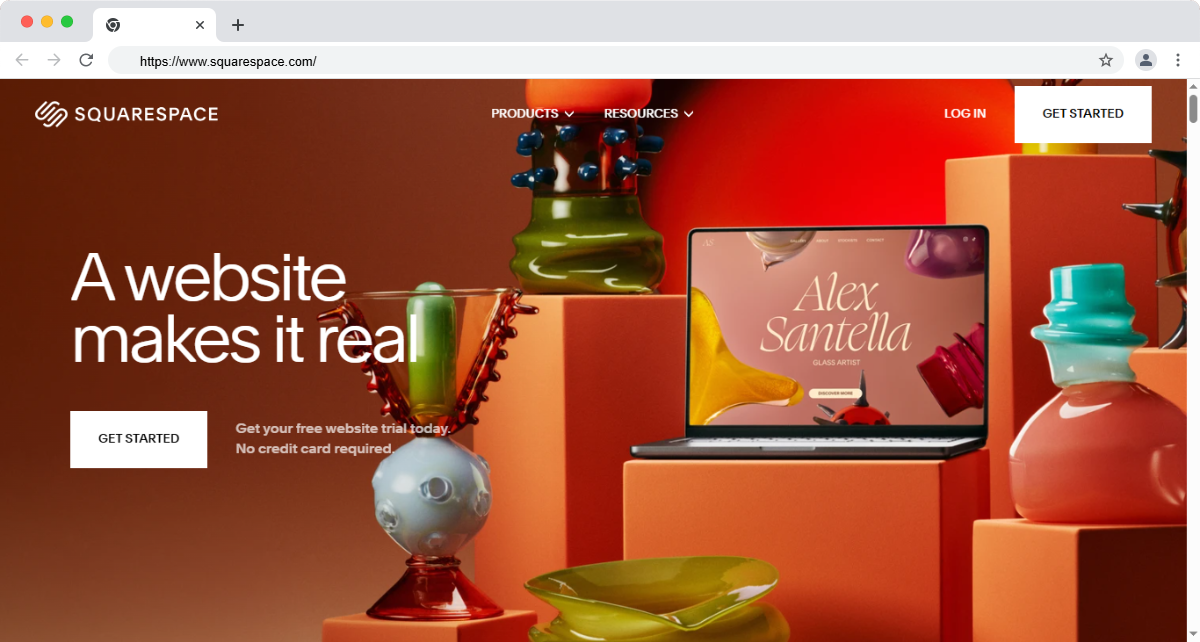
Squarespace is the easiest WordPress alternatives for non-technical users. Both bundle hosting, templates, and editing into one drag-and-drop interface with nothing to install or update. Squarespace leans more polished and design-forward; Wix offers more flexibility and a larger app market.
Squarespace Key Features:
- Award-winning design templates
- Built-in blogging and e-commerce tools
- SEO-friendly and mobile-responsive
- Integrated analytics and email marketing
Squarespace Pros:
- Excellent visual aesthetics
- All-in-one platform for a website
- Great customer support
- Beautiful, designer-built templates out of the box
- Easy editor with strong defaults and minimal setup
- Decent ecommerce + email marketing bundled in
Squarespace Cons:
- Less customizable
- Not ideal for complex websites
- Template-locked design with limited deep customization
- Smaller integration ecosystem than Webflow or Wix
- Performance and Core Web Vitals scores are middling
Squarespace Pricing Plan:
- Personal: $16/month
- Business: $23/month
- Commerce Basic: $27/month
- Commerce Advanced: $49/month
Squarespace Ideal Use Cases:
- Photographers, creatives, portfolio sites, freelancers, restaurants
Squarespace Ratings & Reviews:
- G2: 4.4/5
- Capterra: 4.6/5
Must Read: Webflow vs Squarespace
4. Shopify – Best for E-commerce-First Websites

Shopify is the leading WordPress alternative for online eCommerce stores. Shopify is the market leader in e-commerce, trusted by over 1 million businesses. It offers robust tools for managing products, orders, and payments. Shopify is a user-friendly tool that can help to speed up the process, offer various payment options, and more.
Shopify Key Features:
- Drag-and-drop store builder
- Secure and scalable hosting
- Built-in marketing and SEO tools
- Integrated payment gateways
Shopify Pros:
- Unmatched e-commerce features
- Extensive app ecosystem
- 24/7 customer support
- Massive app marketplace (8,000+ apps)
- Reliable infrastructure built for transactional volume
Shopify Cons:
- Less ideal for content-heavy sites
- Transaction fees (unless using Shopify Payments)
- Locked URL structures (/products/, /collections/) limit SEO control
- Heavier theme code than Webflow or modern static frameworks
- Transaction fees apply unless using Shopify Payments
Shopify Pricing Plan:
- Basic: $39/month
- Shopify: $105/month
- Advanced: $399/month
Shopify Ideal Use Cases:
- Ecommerce-first brands, stores with 100+ SKUs, multi-channel sellersstores, dropshipping, subscription boxes
Shopify Ratings & Reviews:
- G2: 4.5/5
- Capterra: 4.7/5
5. Ghost – Best for Blogging and Memberships

Ghost is a minimalist CMS built specifically for writers and content creators. With the help of Ghost Platform, writers can publish their content. It offers powerful publishing tools and built-in membership monetization. Ghost offers a clean, distraction-free writing environment so that you can focus on what matters most: your content
Ghost Key Features:
- Clean and fast interface
- Markdown editor and theme customization
- Native subscription and email features
- No bloat or unnecessary plugins
Ghost Pros:
- Focused on speed and simplicity
- Ideal for newsletters and paid content
- Open-source and developer-friendly
- Best-in-class for newsletter and paid membership content
- Clean, semantic SEO out of the box
Ghost Cons:
- Limited design flexibility
- Requires self-hosting for full control
- No native ecommerce beyond memberships
- Self-hosted version requires developer setup
Ghost Pricing Plan:
- Starter: $9/month (for up to 500 members)
- Creator: $25/month
- Team: $50/month and up
Ghost Ideal Use Cases:
- Publishers, newsletter-driven brands, creators monetizing with paid memberships
Ghost Ratings & Reviews:
- G2: 4.3/5
- Capterra: 4.5/5
6. Framer – Best for Design-Led Teams
Framer started as a design-prototyping tool and matured into a full website builder. It feels like Figma but outputs a live website. Designers move fast because the canvas, layers panel, and interactions model are all design-tool-native no separate "developer" mode to learn.
Who it's for: Design-led startups, indie founders, and small teams where one designer owns the website end-to-end. Particularly strong for marketing sites and landing pages where animations and visual polish matter more than CMS depth.
Strengths: Best-in-class design tooling, motion design built in, design-system support, native CMS, code components for advanced cases, fast publish workflow, AI-assisted layout suggestions.
Drawbacks: CMS is less mature than Webflow's collections system. Fewer third-party integrations. Smaller developer community and fewer learning resources. Less suited for content-heavy sites with hundreds of CMS items or complex editorial workflows.
Pricing: Free for personal/small sites. Mini plan $5/month. Basic plan $15/month per site. Pro plan $30/month (unlimited bandwidth, advanced CMS). Enterprise on request.
Framer Pros:
- Design-tool-native interface (feels like Figma to use)
- Best-in-class motion design and interactions
- Code components for advanced cases without leaving the platform
Framer Cons:
- CMS less mature than Webflow's collections system
- Smaller integration ecosystem and developer community
- Less suited for content-heavy sites or complex editorial workflows
Framer UseCase:
- Design-led startups, indie founders, marketing sites where animation and visual polish matter most.
If your team thinks in Figma frames first, Framer feels like home. If you need a rich CMS and a deep ecosystem, Webflow still wins.
7. HubSpot Content Hub – Best for B2B Marketing Teams in HubSpot
HubSpot Content Hub (formerly CMS Hub) is the CMS layer of HubSpot's marketing platform. Its main advantage isn't the editor — it's that everything you publish is already wired into HubSpot's CRM, email automation, forms, and lead scoring.
Who it's for: B2B and SaaS companies whose marketing team already lives in HubSpot. Teams that want personalized content based on lifecycle stage, persona, or lead score without stitching third-party tools together to make it work.
Strengths: Native CRM integration, smart content (page changes based on visitor data), built-in A/B testing, marketing automation, native forms and chatbots, AI content tools, SEO recommendations baked into the editor.
Drawbacks: Locked into the HubSpot ecosystem — leaving means rebuilding everything. Design flexibility is narrower than Webflow or Framer. Power features sit behind premium tiers. Not ideal for design-led or developer-first teams.
Pricing: Free CMS for landing pages. Starter $20/month. Professional $500/month (smart content, A/B testing). Enterprise $1,500/month (full marketing automation suite).
HubSpot Content Hub Pros
- Native CRM integration — content tied to lifecycle stage and lead score
- Smart content (page changes based on visitor data)
- Marketing automation, forms, and chatbots built in
HubSpot Content Hub Cons
- Locked into HubSpot ecosystem — leaving means rebuilding everything
- Design flexibility narrower than Webflow or Framer
- Premium tier pricing scales fast as marketing team grows
Ideal For:
- B2B and SaaS marketing teams already running HubSpot CRM
If HubSpot is already your source of truth, Content Hub removes the integration burden of running a separate CMS.
8. Strapi – Best Open-Source Headless CMS
Strapi is an open-source, self-hostable headless CMS built on Node.js. It gives engineering teams a customizable content backend while leaving the frontend completely separate built with React, Next.js, Vue, or whatever stack the team prefers.
Who it's for: Engineering-led teams building modern apps where the website is one of many content surfaces (web + mobile app + customer dashboard + email + IoT). Teams that prioritize ownership, customization, and avoiding vendor lock-in.
Drawbacks: Requires engineering setup and ongoing maintenance not a tool for non-technical teams. You build the frontend yourself. Hosting, upgrades, security, and devops are your responsibility. Content team UX is functional, not delightful.
Pricing: Community edition free (self-hosted, open source). Cloud Pro $99/month. Enterprise on request. Per-seat pricing on cloud tiers.
Strapi Pros
- Open source community edition is free and self-hosted
- Highly customizable schemas with REST and GraphQL APIs
- No vendor lock-in — your servers, your data, your control
Strapi Cons
- Requires engineering setup and ongoing maintenance
- Frontend is your responsibility (separate framework needed)
- Content team UX is functional, not delightful
Ideal For
- Engineering-led teams, multi-channel apps (web + mobile + IoT), orgs prioritizing ownership.
If your team has engineers and wants full control of the content stack, Strapi is the cleanest open-source path.
9. Contentful – Best Enterprise Headless CMS
Contentful is the enterprise-grade headless CMS used by Shopify, Spotify, Equinox, and dozens of major brands. It treats content as structured data every piece flows through one content model and gets delivered via API to any frontend, anywhere.
Who it's for: Enterprise teams running content across multiple channels (web, mobile app, kiosks, voice assistants), multi-region/multi-language operations, and orgs with mature content workflows requiring approval gates and editorial roles.
Strengths: Enterprise SLAs, robust content modeling and validation, powerful localization (50+ languages with locale fallback), granular roles and permissions, GraphQL and REST APIs, strong webhook system, deep integrations with marketing and dev tools.
Drawbacks: Premium positioning means significant cost at scale. Learning curve is real — content modeling decisions made early on are hard to unwind. Frontend dev is on you. Overkill for small marketing sites and SaaS company websites.
Pricing: Free trial. Lite $300/month. Premium and Enterprise custom-quoted. Pricing scales with API calls, content types, and users — most production deployments land at $1,000+/month.
Pros
- Enterprise SLAs, robust content modeling, multi-channel API delivery
- Powerful localization (50+ languages with locale fallback)
- Premium pricing — significant cost at scale
Cons
- Premium pricing — significant cost at scale
- Steep learning curve (content modeling decisions hard to unwind later)
- Frontend dev required separately
WordPress vs Alternatives: side-by-side comparison
Conclusion: Which WordPress Alternative Is Right for You?
Building and customizing your website should be easy with all of these WordPress alternatives.
- If you’re a designer, go with Webflow for complete visual control. Webflow is one of the main competitors to WordPress, offering a powerful combination of a visual website builder and integrated hosting solutions. It revolutionizes how websites are designed and managed, empowering users to create dynamic, high-performing sites without writing a single line of code. With the right guidance from an experienced Webflow expert, you can craft a visually striking and fully functional website that not only elevates your online presence but also drives meaningful results for your business.
- If you’re launching an online store, Shopify is the gold standard.
- If you’re a blogger or content creator, Ghost offers a fast, distraction-free experience.
- If you're just starting out, Wix or Squarespace offers user-friendly interfaces with beautiful templates.
FAQs for WordPress Alternative
1. Is there a free alternative to WordPress?
Yes, platforms like Wix and Webflow offer free plans with basic functionality. However, they usually include ads and limited features.
2. Which platform is easiest to use for beginners?
Wix and Squarespace are considered the most beginner-friendly due to their drag-and-drop editors and pre-built templates.
3. Can I migrate from WordPress to one of these?
Yes, most platforms offer tools or services to help you migrate your content from WordPress, though some manual adjustments may be necessary.
4. Are these alternatives better for SEO?
Platforms like Webflow, Ghost, and Shopify offer strong SEO capabilities. While WordPress is powerful with the right plugins, these alternatives simplify SEO with built-in features.
5.What CMS is faster than WordPress?
WordPress sites loaded with plugins and traditional themes typically score poor Core Web Vitals out of the box. Hosted platforms like Webflow, Framer, Ghost, and Squarespace ship with optimized infrastructure (CDN, image optimization, lazy loading) by default. Static-first headless setups (Strapi + Next.js, Contentful + Next.js) are also significantly faster. For pure speed-out-of-the-box without custom development, Webflow and Ghost are the strongest picks. WordPress can match these speeds, but only with significant performance optimization work.

.jpg)
.jpg)
.jpg)