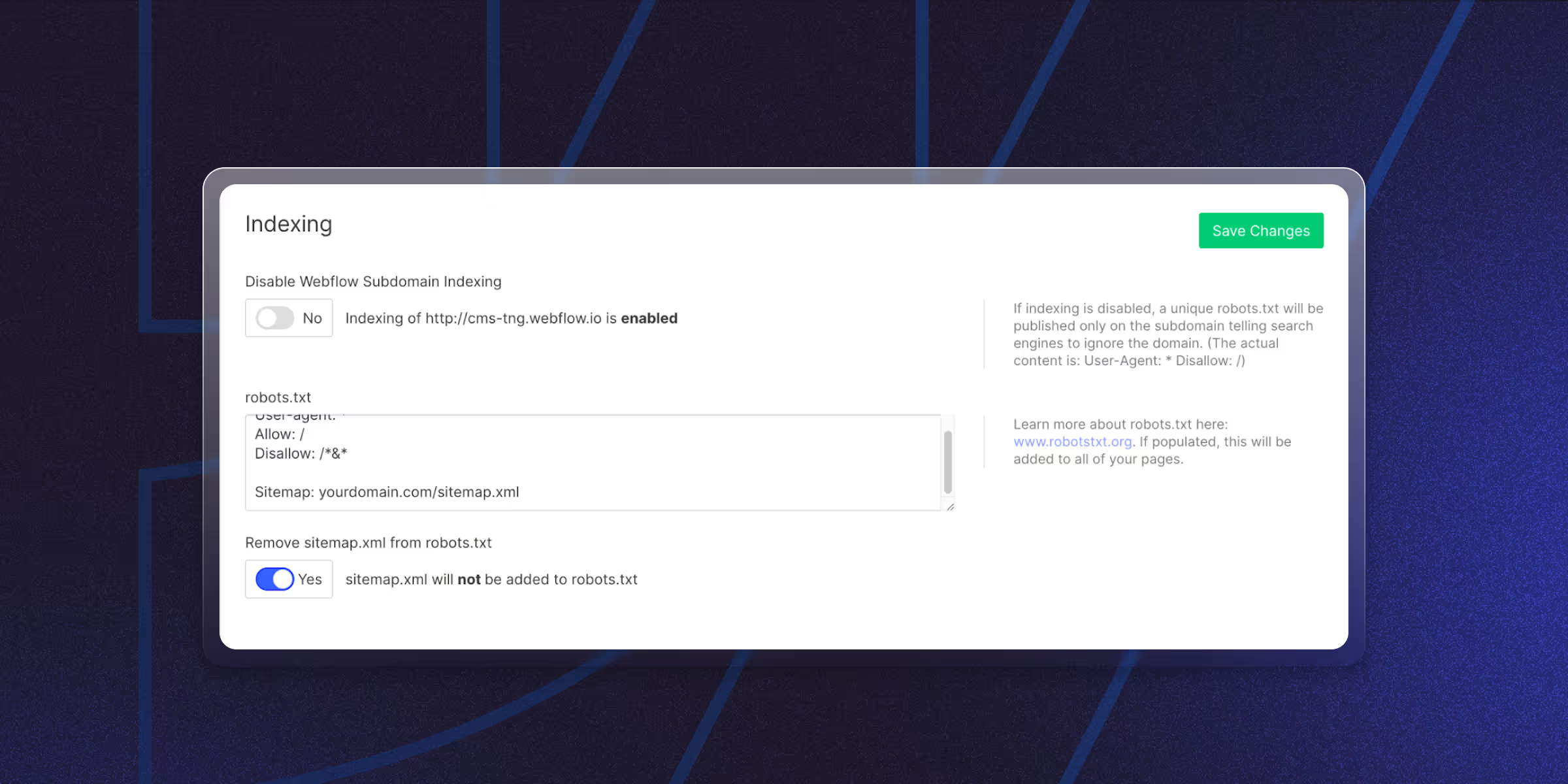
- Webflow automatically generates an XML sitemap for your website.
- You can enable or disable sitemap indexing for specific pages in Webflow settings.
- Submitting your Webflow sitemap to Google Search Console helps search engines discover pages faster.
- XML sitemaps are essential for improving website crawling and indexing.
Table of content
Key takeaways
Webflow can generate an XML sitemap automatically. Turn it on under Site Settings → SEO → Sitemap by toggling "Use auto-generated sitemap," then publish. Your sitemap is then available at `yourdomain.com/sitemap.xml`. For full control, paste your own XML into the same field instead. After publishing, submit the sitemap URL in Google Search Console.
An XML sitemap is a file that lists every URL on your site that you want search engines to crawl. Webflow generates one automatically for every site and hosts it at yourdomain.com/sitemap.xml — but the auto-generated version doesn't always reflect what you actually want indexed.
This guide covers how Webflow's auto-sitemap works, how to find your sitemap URL, when to use a custom sitemap, how to exclude specific pages, and how to submit your sitemap to Google Search Console.
What Is an XML Sitemap?
An XML sitemap lists all URLs on your site. It tells search engines when pages update and how often they change.
If you run a blog with many posts, a sitemap helps Google find every article. Even old posts buried in your archive get indexed.
Sites with proper sitemaps are 30% more likely to get indexed correctly. That means better visibility and more traffic.
Why XML Sitemaps Matter for SEO
Search engines crawl billions of pages, but they miss things. A sitemap guides them to your best content.
Here's what a sitemap does:
- Helps Google find new pages faster
- Shows which pages matter most
- Tells search engines when content changes
- Improves how often your site gets crawled
A sitemap is essential if you want better rankings.
Why Webflow Sites Need XML Sitemaps
Webflow helps you build stunning sites. But without good SEO basics, even beautiful sites fail.
XML sitemaps are extra important for Webflow because:
- They work with Webflow's CMS to index blog posts
- They help large sites with many pages get crawled
- They make sure dynamic content gets found
- They support sites that update often
Where is the Webflow Sitemap Located?
A published Webflow sitemap lives at `https://yourdomain.com/sitemap.xml`. This is the URL you submit to Google Search Console and Bing Webmaster Tools. It only exists on the published site, so confirm you've published after enabling the toggle.
If the sitemap page returns a 404:
- Go to Site Settings → SEO → Sitemap
- Confirm Auto-generate sitemap is toggled on
- Republish the site
The sitemap regenerates automatically every time you publish there's no manual refresh button.
How to Create an XML Sitemap in Webflow?
Webflow's auto-generated sitemap includes every published page and every CMS Collection item. Use a custom sitemap when you need to exclude specific URLs, set custom priority values, or include URLs that Webflow doesn't know about (like externally hosted pages).
Method 1: Webflow's Built-In Sitemap
This automated option works well for most users.
Steps-by-step:
- Open your Webflow project
- Go to Project Settings
- Enable Auto-generate sitemap
- Publish your website
- Access your sitemap at "/sitemap.xml"
Method 2: Create a Manual Sitemap
For more control, build a custom sitemap.
- List all your URLs
- Add metadata like update dates
- Format it as XML
- Upload to your hosting
This works best for advanced users.
Method 3: Use Third-Party Tools
Tools like Yoast SEO or RankMath give you extra control.
These help if you manage complex sites or need special features.
How to Submit a Webflow Sitemap to Google/SERP
In Google Search Console, open Sitemaps in the left menu, enter `sitemap.xml` in the "Add a new sitemap" field, and click Submit. Google will fetch it and start using it to discover pages. Re-submission isn't needed after each publish - Google re-crawls the same URL automatically.
Google Search Console steps:
- Open Google Search Console
- Select your property/website
- Go to Sitemaps section
- Enter your sitemap URL
- Click Submit
Bing Webmaster Tools uses a similar process. Check back often for errors.
Best Practices for Webflow XML Sitemaps
Get more from your sitemap with these tips:
- Remove pages you don't want indexed
- Update your sitemap when you add content
- Check for errors in Search Console
- Keep URLs clean and simple
- Only include live, working pages
Fixing Common Sitemap Problems
Here's how to solve typical issues:
- Sitemap not showing: Check that you published your site and enabled the feature.
- Pages missing: Make sure they're set to be indexed in page settings.
- Errors in Search Console: Look for broken links or redirect issues.
- Slow indexing: Submit your sitemap again and check for crawl errors.
How to exclude pages from your Webflow sitemap
Webflow auto-includes every published page in the sitemap by default. To exclude a specific page (e.g., a thank-you page, a duplicate landing page, or a noindexed page):
- Open the page in the Designer
- Click Page Settings (gear icon)
- Scroll to SEO Settings
- Toggle Sitemap Indexing off
- Republish
The page will be removed from the auto-generated sitemap on next publish. For CMS Collection items, toggle Sitemap Indexing off at the Collection template level Webflow doesn't support per-item exclusion through the UI.
For larger exclusion needs (whole folders, conditional logic), switch to a custom sitemap instead.
Conclusion
A good XML sitemap helps search engines understand your site. Use Webflow's built-in feature, make one manually, or try third-party tools.
The important part is making sure search engines can navigate your site easily.
Ready to level up your Webflow site’s SEO? At theCSS Agency, we specialize in crafting SEO-optimized sites that drive traffic and conversions.
FAQs
1. Does Webflow have a sitemap generator?
Yes. Webflow creates sitemaps automatically when you enable the feature in SEO settings.
2. How do I check my Webflow sitemap?
Visit yourdomain.com/sitemap.xml. You can also check it in Google Search Console.
3. Should I exclude some pages?
Yes. Remove thank you pages, admin areas, and test pages so they don't get indexed.
4. How often should I update my sitemap?
Webflow updates it automatically when you publish. Manual sitemaps need updates when you add or remove pages.
5. Can I create multiple sitemaps in Webflow?
No. Webflow makes one sitemap for your whole site. Large sites need manual setup for multiple sitemaps.
6. Will a sitemap improve my rankings?
Not directly. But it helps Google find and index pages faster, which can boost visibility over time.
7. How often does Webflow update the XML sitemap?
Webflow regenerates the auto-sitemap on every site publish. There's no scheduled regeneration — if you change content but don't republish, the sitemap stays stale. For high-frequency content sites, make republishing part of your editorial workflow.
8. Why are some pages missing from my Webflow sitemap?
Three common causes: (1) the page has Sitemap Indexing toggled off in Page Settings, (2) the page is unpublished or in draft, or (3) the page is noindexed via SEO settings, which Webflow uses as a signal to exclude from the auto-sitemap. Check all three before troubleshooting further.
9. How do I submit my Webflow sitemap to Google?
Go to Google Search Console → your property → Sitemaps in the left nav. Enter <code>sitemap.xml</code> in the "Add a new sitemap" field and click Submit. Google will fetch the sitemap immediately and recrawl your URLs over the following days. Resubmit after major content updates.
Last updated on:
July 24, 2026

Viken Patel

Viken Patel has 17+ years of experience working with websites. He is passionate about building website that converts. His marketing background helps him build the sales driven websites.
Related Article
Webflow
ADA Compliant Website Checklist (2026): Requirements, Deadlines & How to Audit
A practical ADA website compliance checklist based on WCAG 2.1 AA: who must comply, the 2027–2028 deadlines, 25 checks, how to audit, and why overlays don't protect you.
September 30, 2026
Webflow
Webflow MCP: What It Is & How to Set It Up?
The Webflow MCP server is a bridge that lets an AI agent read and change your Webflow site through natural language.
September 28, 2026
.jpg)
Webflow
Design
How to Write a Website Redesign RFP 2026
Website redesign RFP is a written brief that invites agencies to propose how they’d redesign your site, on what timeline, and at what cost.
September 18, 2026
Let's Work Together
Partner with a Webflow Agency for your Webflow website.
Quick Turnaround. No Contracts. Cancel Anytime. Book a 30 minutes consulting call with our expert.